Introducing Wedding OS
One operating system for your entire wedding.
Wedding OS connects your budget, guest list, seating chart, vendor contracts, task board and wedding-day run sheet — so a change in one place updates everywhere else. No spreadsheets. No lost group chats. No surprises three weeks before the big day.
Everything, connected
Mark a payment as paid in Budget, and it clears instantly from your Command Centre and Contracts tab.
18
connected modules across four workspaces
HK$0
to start the Core plan
Why we built it
Planning a wedding shouldn't mean twelve open tabs.
A typical Hong Kong wedding touches a dozen vendors, two families, a shifting guest count and a budget that moves every week. Most couples end up tracking it across a spreadsheet, a notes app, three group chats and a stack of PDF quotes — and something always slips through.
Wedding OS replaces that scattered setup with one connected workspace. Every number, date and decision lives in one place, and every module reads from the same source of truth — your wedding.
One source of truth
Update a task, a payment or a guest once. Every dashboard, checklist and report reflects it instantly.
Built for the region you're marrying in
Choose from 11 regions and 17 cultural ceremonies — the task list adapts to your traditions automatically.
Numbers first, decisions second
12 calculators turn guesswork into real Hong Kong figures before you commit to a vendor.
Nothing falls through the cracks
Risk register, decision log and overdue-payment alerts surface problems while you can still fix them.
Inside Wedding OS
Real screens. Real workflow.
Every screenshot below is the actual Wedding OS product, shown with sample planning data.
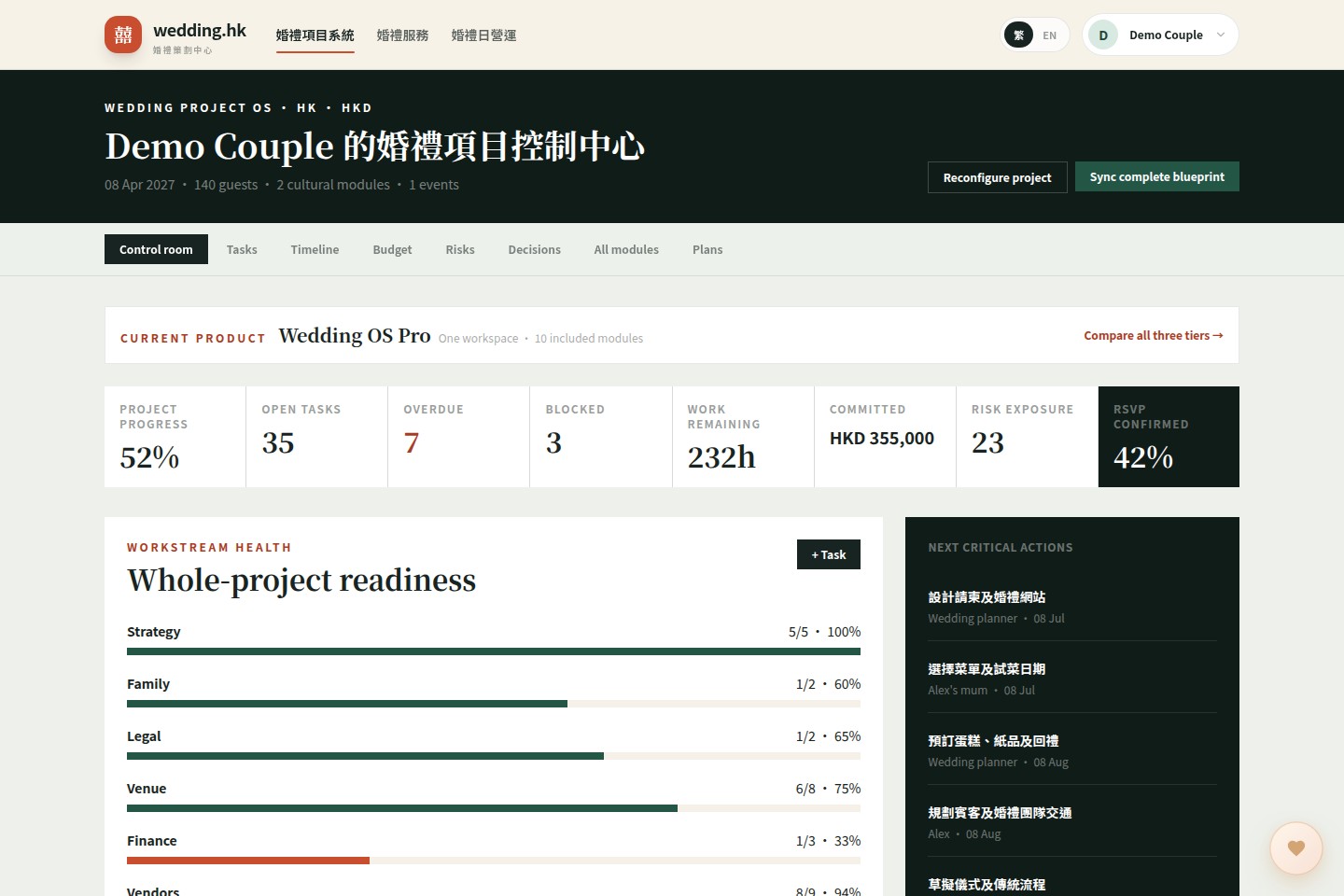
01 · Command centre
Every wedding metric, on one screen.
The command centre is your control room: project progress, open and overdue tasks, blocked items, remaining work hours, committed spend, risk exposure and RSVP rate — eight live numbers that tell you exactly where the wedding stands today.
- 8 live KPI tiles: progress, tasks, overdue, blocked, hours, spend, risk, RSVP
- Workstream health bars across strategy, family, venue, finance, vendors and more
- Next critical actions ranked by due date, right on the home screen
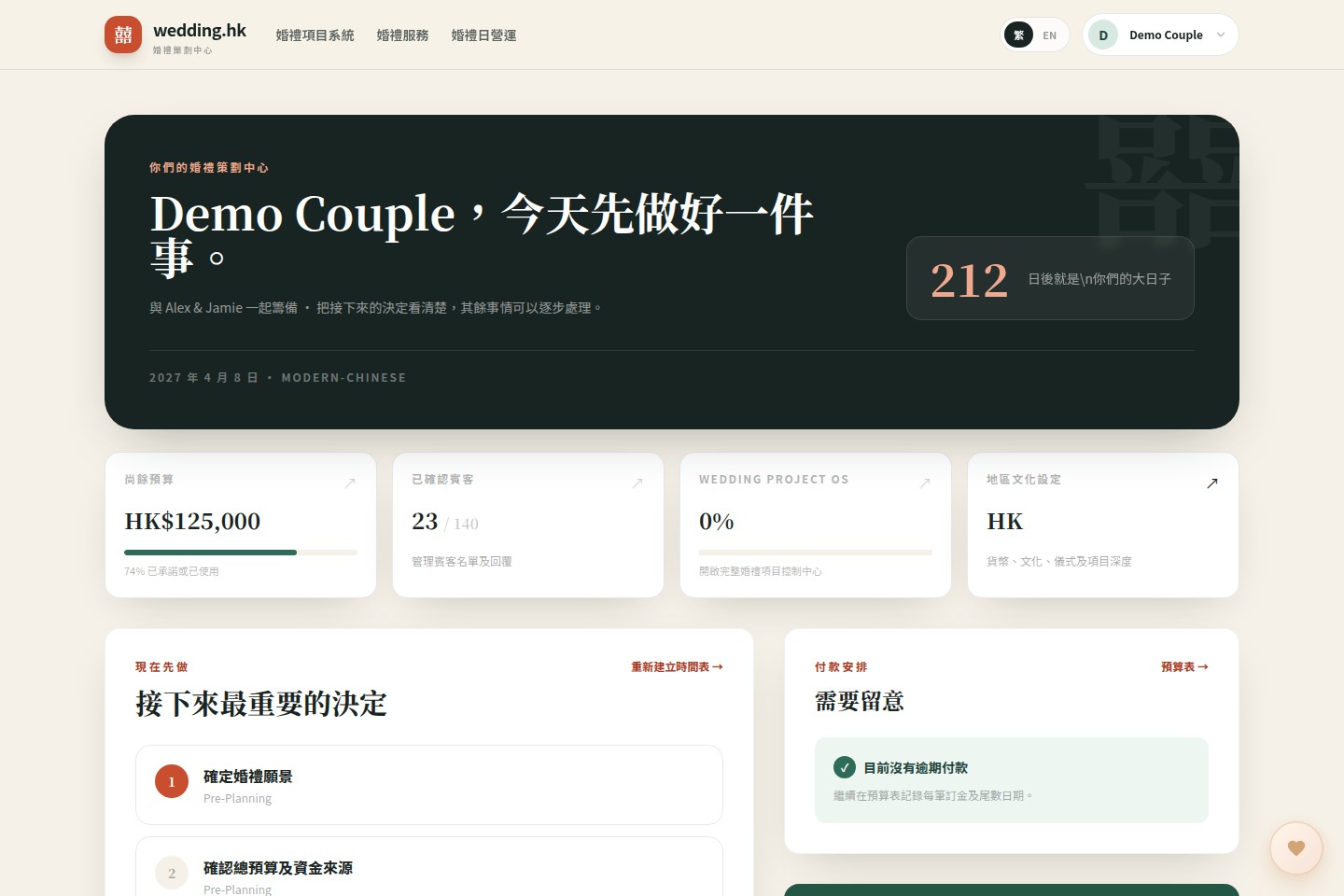
02 · Your wedding home page
Log in, and know exactly what to do today.
The dashboard opens with your countdown, budget left, confirmed guest count and Wedding OS progress — then surfaces the next most important decisions and any payment that needs attention, so you never have to go hunting for what matters.
- Live countdown to the wedding date
- Budget-left and confirmed-guest cards, updated in real time
- Next steps and overdue payments surfaced automatically
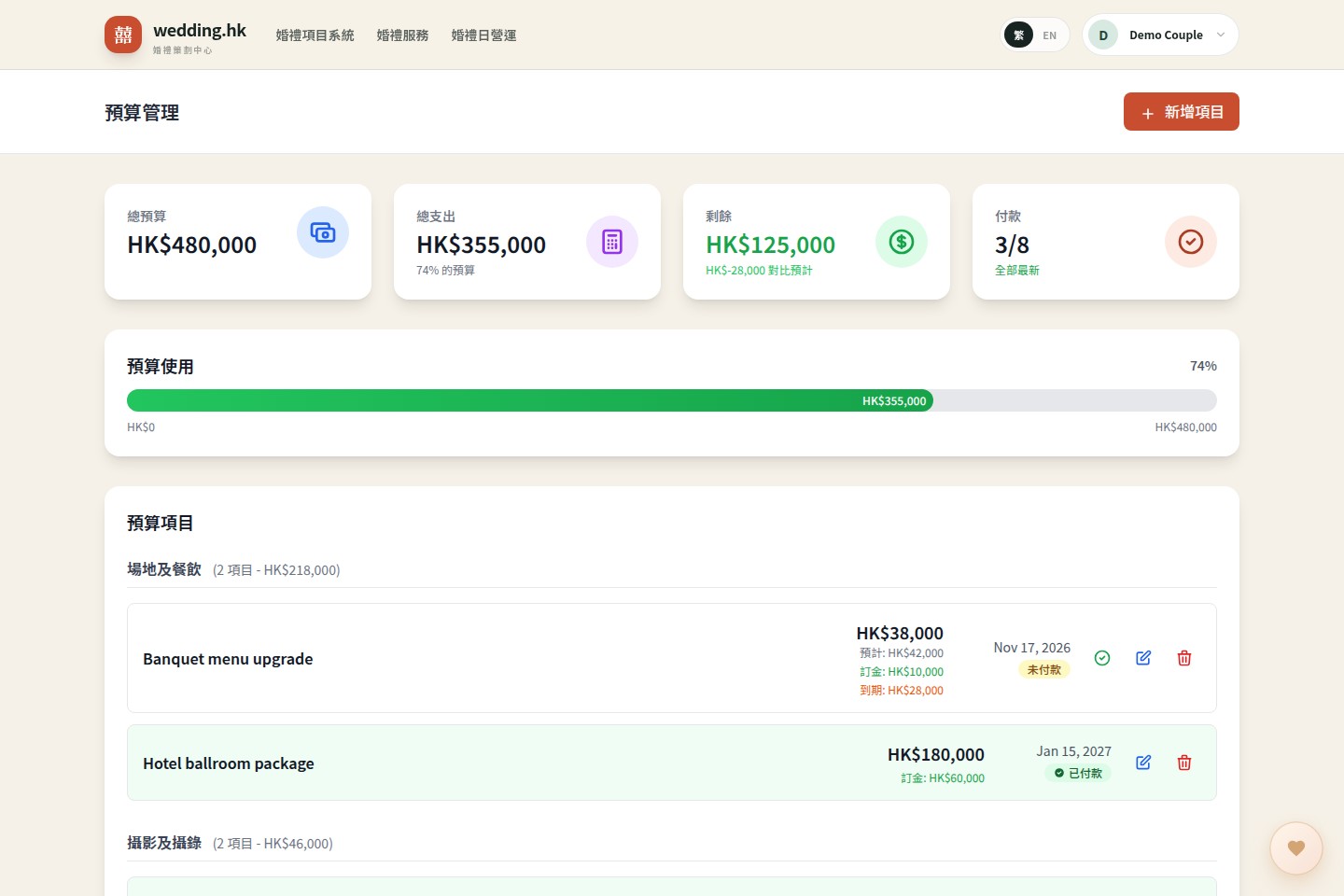
03 · Budget & payments
Watch every dollar, from deposit to final balance.
Track estimated versus actual cost per category, deposits paid, and what is still outstanding — with a live usage bar so you know the moment you are close to your ceiling. Mark items paid in one tap.
- Budget-left, spent-so-far and payment-count summary cards
- Category breakdown: venue, photography, attire, decoration, entertainment and more
- Overdue and due-soon payment alerts before they become a problem
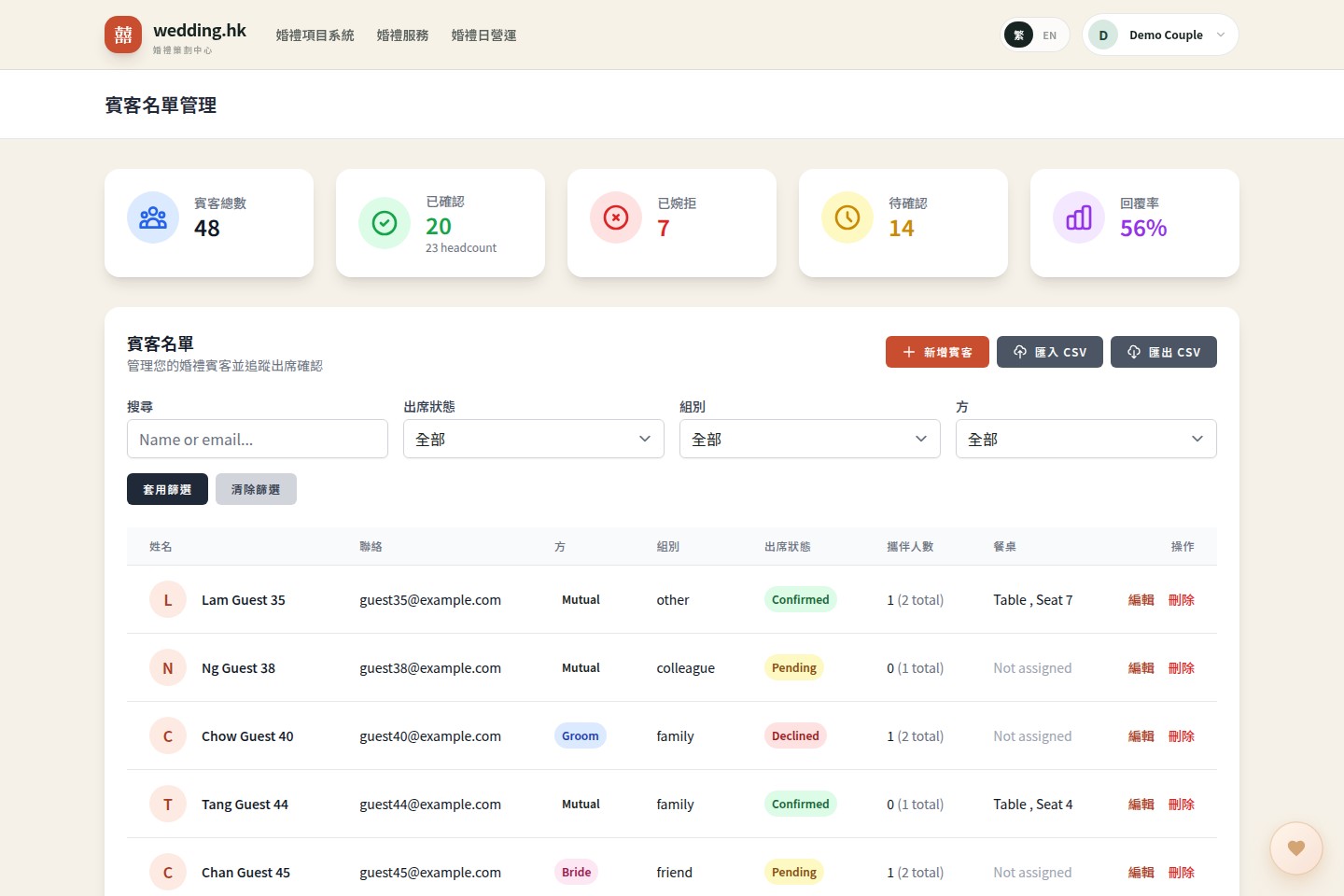
04 · Guests & RSVP
Know exactly who is coming, and what they need.
Every guest carries side, group, RSVP status, plus-ones, dietary needs and seat assignment. Send a private RSVP link per household and responses update your headcount and dietary report instantly.
- Confirmed / declined / pending / response-rate summary at a glance
- Filter by RSVP status, group, side and search by name or email
- Import and export the full guest list as a file
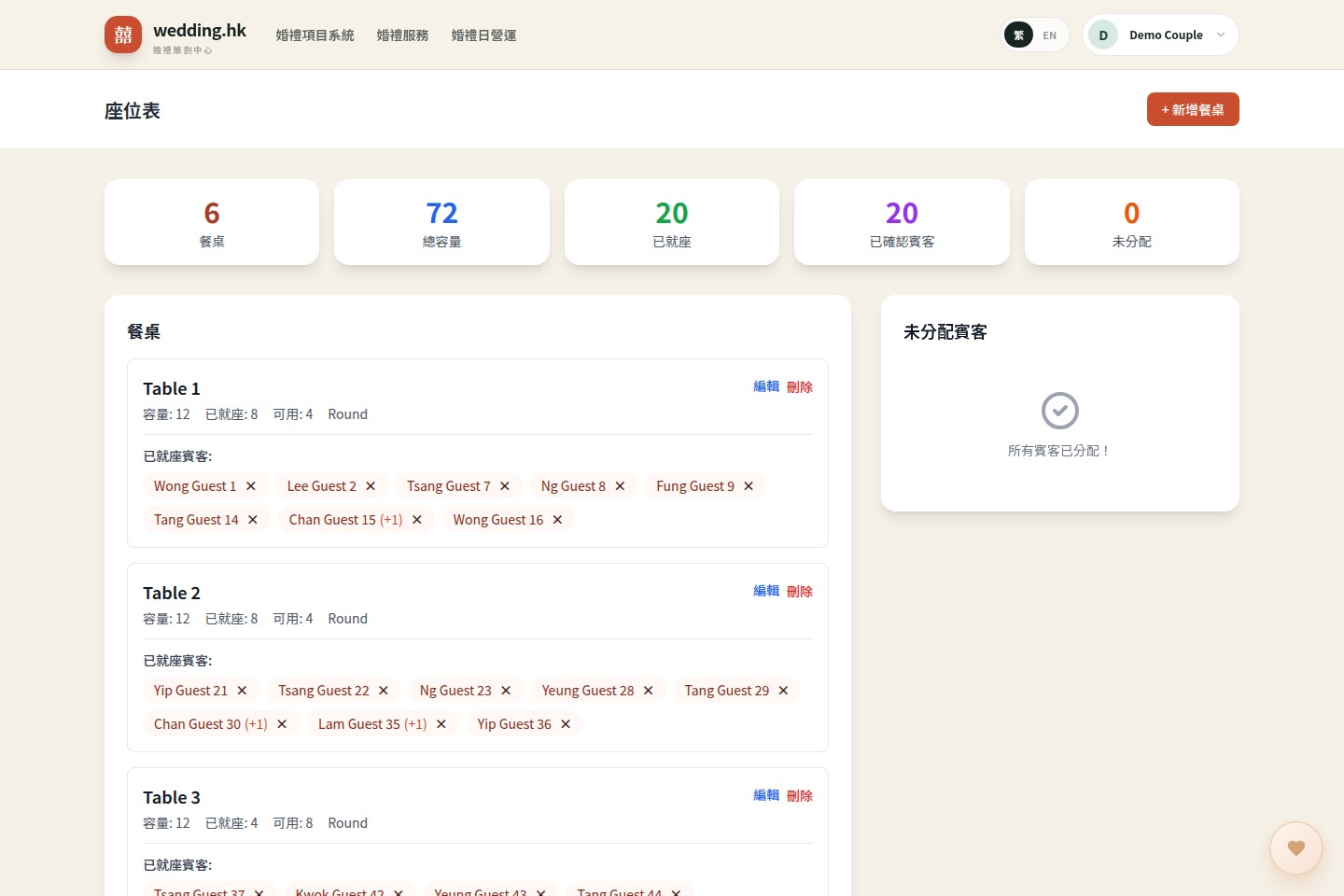
05 · Seating plan
Fill every table without a spreadsheet headache.
Create tables with a capacity, then assign confirmed guests one click at a time. Wedding OS tracks total capacity, seated count and who is still unassigned, so nobody gets left standing.
- Table, capacity, seated-count and unassigned-guest summary cards
- Only confirmed guests appear in the assignment pool
- Add, edit or remove tables as your floor plan changes
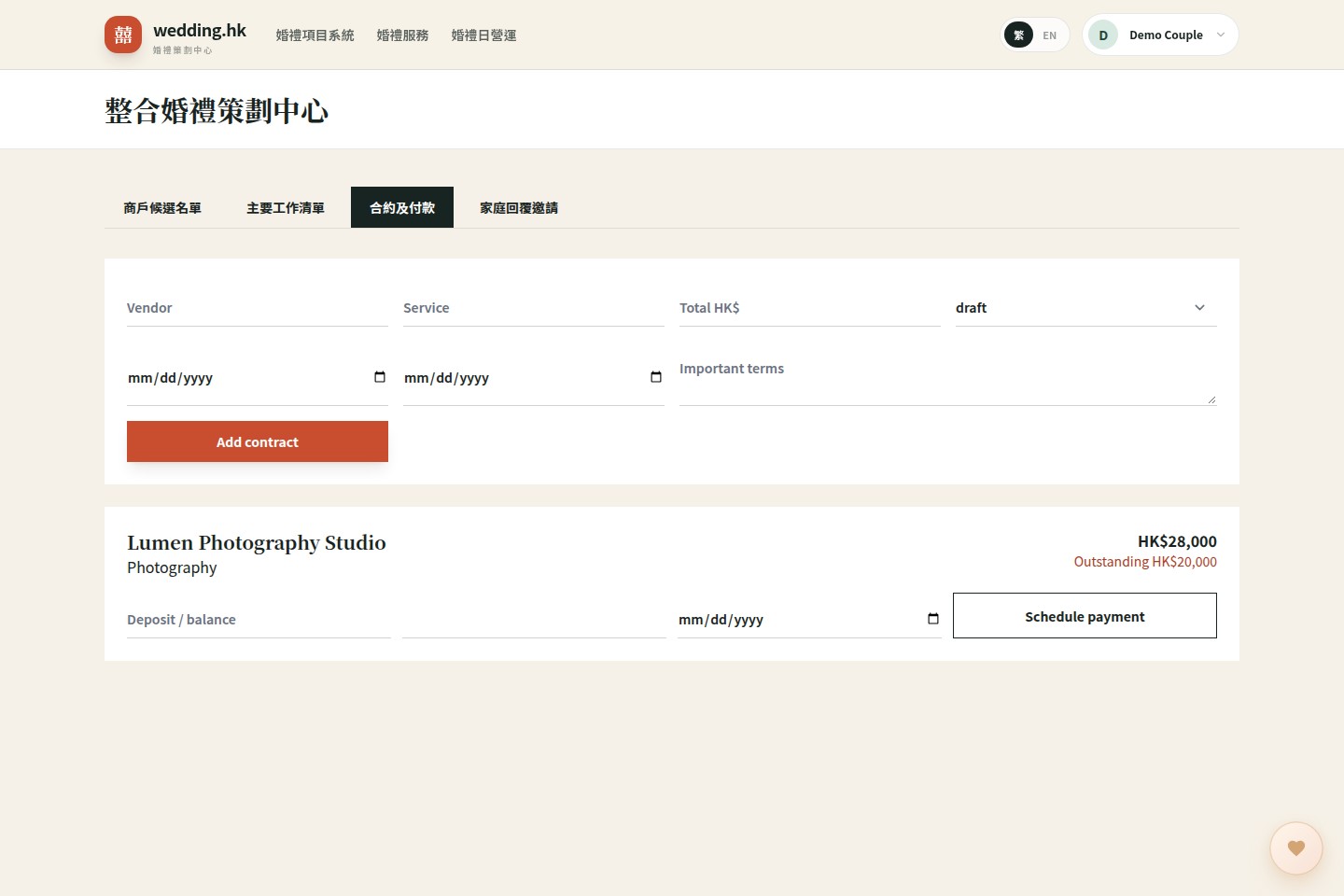
06 · Connected planning hub
Vendors, contracts and payments, without switching tabs.
Move vendors through a real pipeline — saved, contacted, meeting, quoted, booked — then attach the signed contract with its cancellation deadline and headcount deadline. Instalments and outstanding balances are tracked automatically.
- Vendor shortlist pipeline from saved to booked
- Contracts with cancellation and headcount deadlines
- Payment schedule per contract, with outstanding balance shown live
- Household RSVP links generated automatically for each family
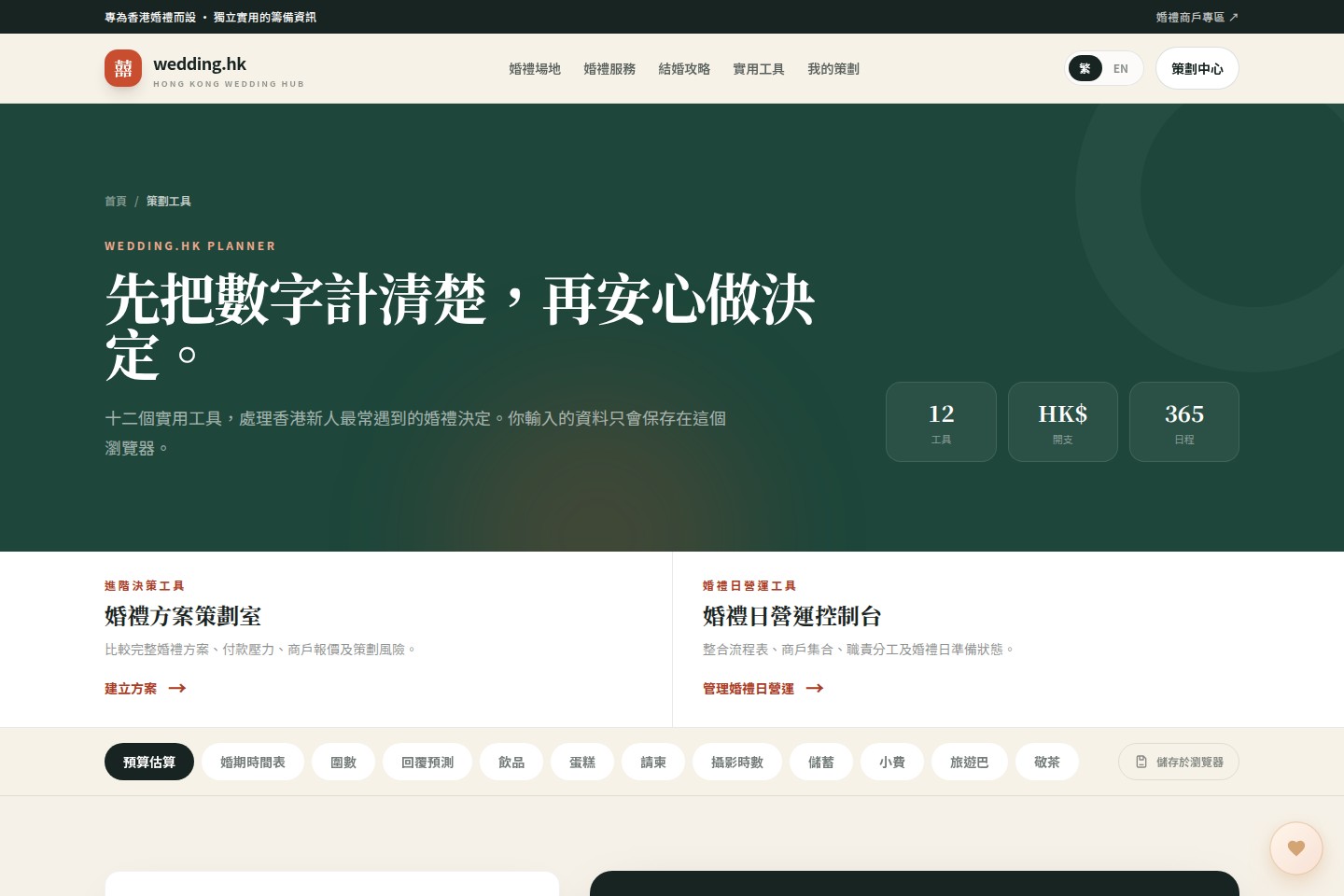
07 · Twelve calculators
Turn guesswork into real numbers, before you sign anything.
Budget estimate, wedding timeline, table count (圍數), RSVP forecast, drinks, cake, invitations, photo hours, savings plan, gratuity, coach seats and tea-ceremony timing — twelve focused tools for the decisions Hong Kong couples make most often.
- Free and public — no account needed to try the calculators
- Every input stays in your browser; nothing is uploaded
- Save your results and carry them straight into your OS budget
Regional & cultural blueprint
Not a generic checklist. Your checklist.
During setup you pick your region and the ceremonies you are having. Wedding OS installs a 57-task base blueprint across 17 workstreams, then layers in the right cultural tasks automatically.
Hong Kong
Tea ceremony · Door games · Betrothal gifts
Singapore
Tea ceremony · Solemnisation · Multicultural
Malaysia
Tea ceremony · Nikah · Multicultural
Taiwan
Engagement · Tea ceremony · Banquet
Japan
Shinto · Western ceremony · Reception
South Korea
Paebaek · Wedding hall · Family gifts
Thailand
Monk blessing · Water pouring
Indonesia
Akad nikah · Family ceremony
Philippines
Church ceremony · Sponsors
Vietnam
Engagement · Ancestor ceremony
India
Mehndi · Sangeet · Ceremony
57
base planning tasks
across 17 workstreams, from strategy to post-wedding
17
cultural ceremony modules
tea ceremony, nikah, sangeet, shinto and more
11
supported regions
each with its own currency, timezone and traditions
Pricing
Start free. Upgrade only if you need to.
Wedding OS Core is free for every couple. Plus and Pro unlock deeper planning tools for multi-vendor, multi-event and multicultural weddings.
Wedding OS Core
A complete foundation for couples planning one wedding.
Free
Start free- Regional and cultural blueprint
- Checklist and milestones
- Budget and payment tracking
- Guests, RSVP and seating
- 12 wedding calculators
Wedding OS Plus
Deeper planning control for multi-event and multicultural weddings.
HK$288 one-time
Start with Core, upgrade later- Everything in Core
- Task board and ownership
- Dependency timeline
- Vendor shortlist and contracts
- Scenario, quotation and cash-flow studio
Wedding OS Pro
Professional-grade control for complex weddings and planning teams.
HK$688 one-time
Start with Core, upgrade later- Everything in Plus
- Risk register and decision log
- Workload and readiness analytics
- Live wedding-day operations
- Run sheets, vendor calls and responsibility matrix
Every couple starts on Core for free. No credit card required.
Built in the open
What is shipped today, and what is next.
We would rather tell you exactly what works today than oversell. Here is our honest roadmap.
Now
Command centre, budget, guests, seating, planning hub, contracts, RSVP links and 12 calculators — all live today.
Next
Persisting the Scenario Studio and Wedding-Day Console to your account, plus payment and task reminders by email.
Later
Side-by-side vendor comparison, drag-and-drop seating, printable seat cards and critical-path scheduling.
Vision
Two-way vendor collaboration, a couple wedding website, and a full post-wedding thank-you and archive flow.
Have more questions about Wedding OS?
Read the FAQ or contact our team directly.
Ready when you are